
Data and AI · Across the USA
Data and AI Consulting, Training and Automation
Foxcomm helps US businesses adopt AI safely and profitably: readiness assessments, hands-on employee training, Microsoft 365 Copilot rollouts, agentic AI and workflow automation, and the data foundations that make it all work. Backed by our 24/7 help desk and ISO 27001 information security management.
Practical AI for business
AI that your people actually use
Most AI projects stall for the same reason: tools are bought, but people are not trained, processes are not redesigned and data is not ready. Foxcomm approaches AI as a change program, not a software purchase. We start with how your teams really work, choose the Microsoft and Azure AI tools that fit, train your people to use them confidently and safely, and put governance around the data they touch.
As a Microsoft Solutions Partner already managing your Microsoft 365, Entra, Azure and security, we are well placed to connect AI to the systems you use every day, whether that means Copilot in Outlook, Teams and Word, a custom agent that answers staff questions from your own documents, or automations that remove repetitive admin from your week.

What you get
• An AI readiness assessment and prioritized roadmap
• Hands-on training for leaders, staff and technical teams
• Microsoft 365 Copilot and Copilot Studio deployment
• Agentic AI and automation of repetitive tasks
• Data platforms and reporting with Microsoft Fabric and Power BI
• Governance, security and acceptable-use policies
How Foxcomm helps
From first idea to everyday AI


AI readiness assessment
We review your data, security, licensing and workflows, interview your teams and identify where AI will pay back quickly, then deliver a prioritized roadmap with realistic effort, risk and return.
Employee AI training
Role-based workshops, live demos on your own documents, prompt-writing skills and ongoing coaching, so every employee knows what to use AI for, what to avoid and how to check results.

Work process transformation
We map how work really flows, find the repetitive, rules-based steps and redesign processes so people and AI each do what they do best, with clear owners and measurable time savings.

Agentic AI and automation
AI agents and automations that handle simple tasks end to end: triaging mailboxes, drafting replies, extracting data from documents, updating records and routing approvals, with humans in control.

Data platforms and analytics
Clean, connected data is the fuel for AI. We build data foundations and dashboards with Microsoft Fabric, Azure and Power BI so decisions rest on one trusted version of the numbers.

AI governance and security
Acceptable-use policies, data classification, access controls and monitoring with Microsoft Purview, Entra and Defender, so staff can use AI without exposing client or company data.
Employee training
How we train your team to use AI
AI for leaders: strategy, risk and return
A focused half-day session for owners, partners and managers: what generative AI and agents can and cannot do, where they create real value in your sector, the legal, privacy and reputational risks, and how to sponsor adoption without slowing the business down. We cover the Microsoft tools you already pay for, such as Microsoft 365 Copilot, and what a sensible first budget looks like.
Leaders leave with a shortlist of high-value use cases, a view on cost and return, clear rules for responsible use and a simple 90-day plan.
• What AI and agents can and cannot do today
• Risk, privacy and regulatory considerations for your sector
• Choosing and prioritizing use cases
• Budget, licensing and measuring return
• Setting acceptable-use rules and ownership
• A 90-day adoption plan for your leadership team
Agentic AI and automation
Let AI handle the routine, keep people in control
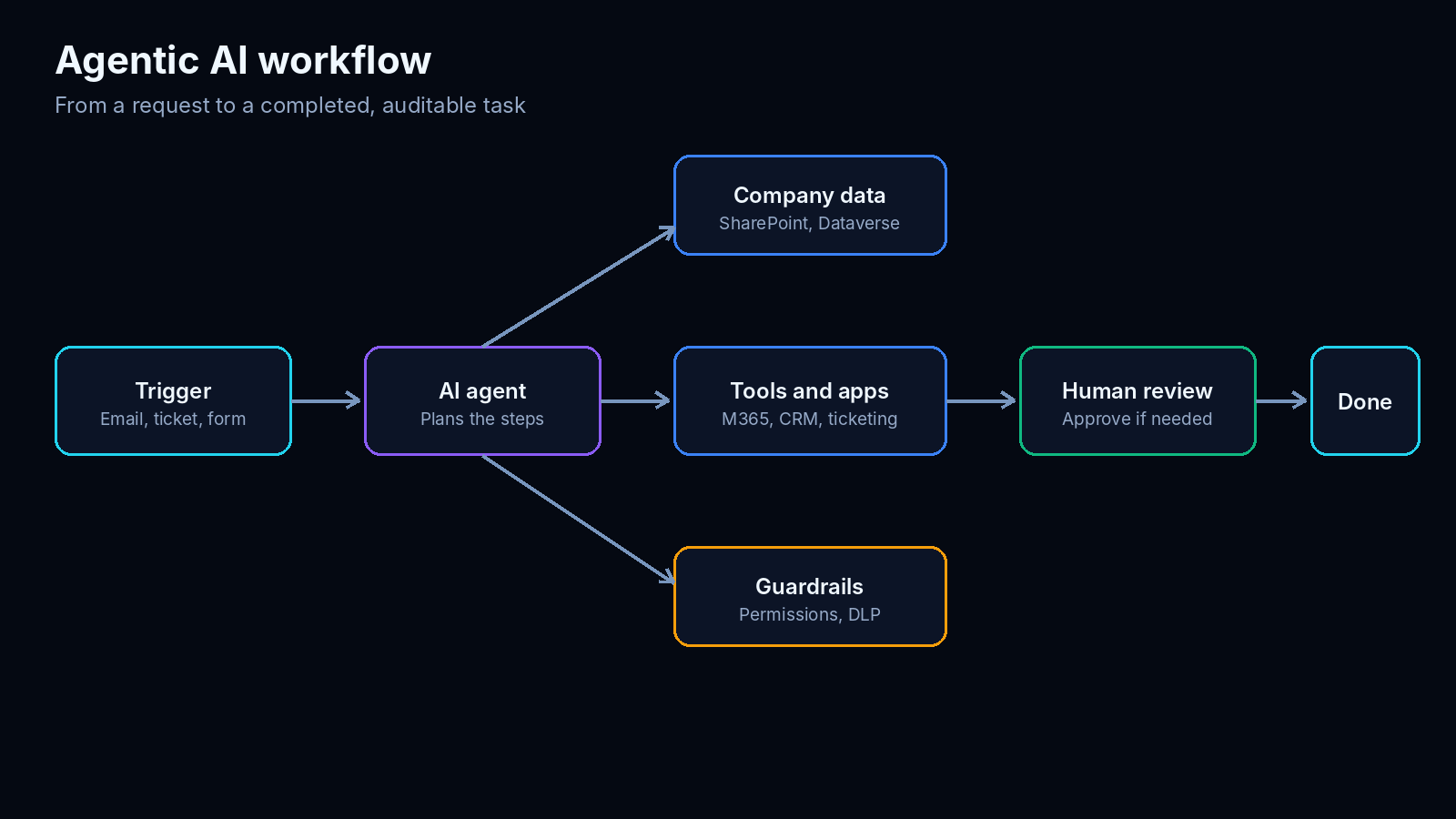
Agentic AI goes beyond answering questions. An agent can plan a task, use your systems and complete several steps for you, from reading an incoming request to updating a record and sending a confirmation. Foxcomm designs agents and automations for simple, well-defined tasks first, so you see value in weeks, then extends them as trust grows.
Every solution includes human approval where it matters, full audit logs, least-privilege access through Microsoft Entra and clear fallbacks, so an agent never acts outside the limits you set.
We build on Microsoft Copilot Studio, Power Automate and Azure AI, and connect them to Microsoft 365, SharePoint and your line-of-business applications.
Tasks we commonly automate
• Sorting and replying to shared mailboxes and enquiries
• Extracting data from invoices, forms and contracts
• Onboarding and offboarding checklists
• Meeting summaries, action items and follow-ups
• Weekly reports and dashboard commentary
• Internal helpdesk and policy questions
• Approvals, reminders and document filing
Microsoft AI
Microsoft AI products we deploy and support
Microsoft 365 Copilot
AI assistance in Word, Excel, PowerPoint, Outlook and Teams, grounded in your own work data and respecting existing permissions. We handle licensing, readiness, rollout and training.
Microsoft Copilot Studio
Build custom agents that answer questions from your documents, automate processes and connect to your systems, published to Teams, Microsoft 365 or your website.
Microsoft Foundry and Azure OpenAI
Build secure, private AI applications on Azure with enterprise-grade models, your own data and your security controls: document intelligence, search and custom assistants.
Power Platform
Power Automate, Power Apps and Power BI to automate workflows, build simple business apps and visualize results, with AI features built in.
Microsoft Fabric
A unified data and analytics platform that brings your data together for reporting, forecasting and AI, with governance built in.
Microsoft Purview and Entra
Data classification, sensitivity labels, data loss prevention and identity controls that keep AI from exposing information to the wrong people.

Use cases
Where AI saves time in your business
Finance and operations
Extract and match invoice data, summarize contracts, draft management commentary, reconcile spreadsheets, chase approvals and generate recurring reports.
• Invoice and expense processing
• Forecasting and variance explanations
• Procurement and approval workflows
HR and recruiting
Draft job descriptions, summarize applications with human review, answer policy questions through an internal assistant, and automate onboarding and offboarding tasks.
• Employee self-service assistant
• Onboarding and offboarding checklists
• Training content creation
Sales, marketing and customer service
Summarize calls and emails, draft proposals and follow-ups, personalize campaigns, triage enquiries and suggest answers from your knowledge base.
• Proposal and reply drafting
• CRM updates from meetings
• Enquiry triage and routing
Legal, professional services and IT
Review and summarize documents, search past matters and precedents, draft first versions of letters and reports, and resolve common IT requests automatically, always with professional review of outputs.
• Document review support
• Knowledge search across your files
• IT helpdesk automation
Safe and responsible AI
AI without the security headaches
Protect your data
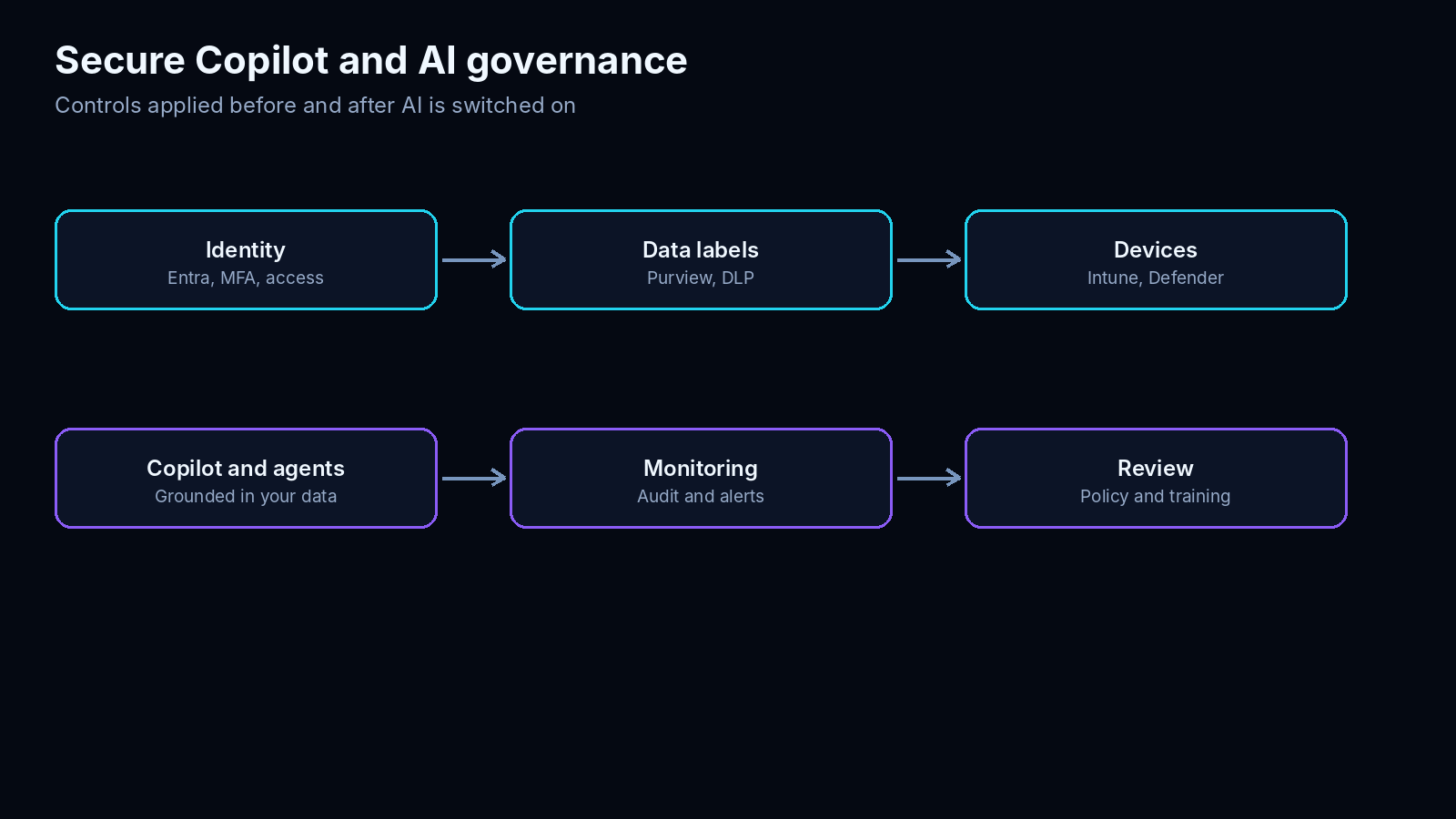
We label and classify sensitive information, apply data loss prevention and review SharePoint and OneDrive permissions before rolling out Copilot, so AI only surfaces what each person is already allowed to see.
Control access
Microsoft Entra conditional access, multi-factor authentication and role-based permissions govern who can use which AI tools, and from which devices.
Set the rules
Clear acceptable-use policies, approved tool lists and staff guidance, aligned with ISO 27001 practices and, where relevant, NYDFS, HIPAA, SOC 2 and the NIST AI Risk Management Framework. Foxcomm supports your compliance program but does not replace legal or audit advice.
Our approach
A four-step AI adoption roadmap
Assess
We review workflows, data, security and licensing, then shortlist high-value, low-risk use cases.
Pilot
We prove value with a small group on one or two use cases, measuring time saved and quality.
Train and adopt
Role-based training, champions and clear guidance so staff use the tools well from day one.
Scale and govern
We roll out wider, add agents and automation, monitor usage and cost, and keep policies current.
FAQ
Data and AI: your questions answered
What does Foxcomm's Data and AI service include?
AI readiness assessments, employee training, Microsoft 365 Copilot and Copilot Studio deployment, agentic AI and workflow automation, data platforms and analytics, and AI governance and security, all supported by our 24/7 help desk.
Can you train our employees to use AI safely?
Yes. We run role-based workshops for leaders, everyday staff and IT teams, using your own tools and documents. They cover effective prompts, checking AI output, protecting confidential data and your acceptable-use policy. We also offer follow-up clinics and an AI champions program.
What is agentic AI and which tasks can it automate?
Agentic AI can plan and complete several steps of a task using your systems, not just answer questions. Good starting tasks are simple and rules-based: sorting mailboxes, extracting data from documents, updating records, preparing reports and routing approvals. We keep humans in control with approvals and audit logs.
Is our data safe when we use Copilot and other AI tools?
Microsoft 365 Copilot works within your existing permissions, so it is important to review access and data classification first. We prepare your tenant with Microsoft Purview, Entra and Defender controls and set acceptable-use rules, so AI only surfaces information people are entitled to see.
How much does an AI project cost?
It depends on scope. Assessments, training and pilots are quoted as fixed-scope projects, while ongoing support is priced per user. The quickest way to get a clear number is to fill in our quote form. Get a free quote
Explore related IT services and platforms
Start with AI
Ready to put AI to work?
Tell us what you would like to improve, and a Foxcomm engineer will suggest practical first steps.
Get a free quote