
Virtual Desktops · Citrix · New York
Virtual Desktops and Citrix in New York: Your Secure Desktop, on Any Device
Foxcomm hosts secure Windows desktops on Citrix, Azure Virtual Desktop and AWS virtual desktops for businesses in New York and across the USA, so your team gets the same workspace from any device, backed by a 24/7 help desk.
Virtual desktops New York
Virtual desktop and hosted desktop services for New York businesses
A virtual desktop moves your Windows workspace, applications and files into a secure cloud environment. Staff sign in from almost any laptop, tablet or home computer and see exactly the same desktop every time. Nothing sensitive is stored on the device, new starters can be productive on day one, and leavers are cut off in a single step.
Foxcomm designs, hosts and supports virtual desktops, often called desktop as a service, for professional services, finance, creative and growing businesses. Our London headquarters and New York office manage the platform, the applications and the security around it, so you get a predictable monthly cost and no desktop hardware refresh cycle.

Virtual desktops at a glance
- Secure hosted Windows desktops
- Access from almost any device
- Centralized data, backup and security
- Fast onboarding and instant offboarding
- Predictable monthly pricing
Choose your platform
Citrix, Azure and AWS virtual desktops
Citrix virtual desktops, managed by Foxcomm
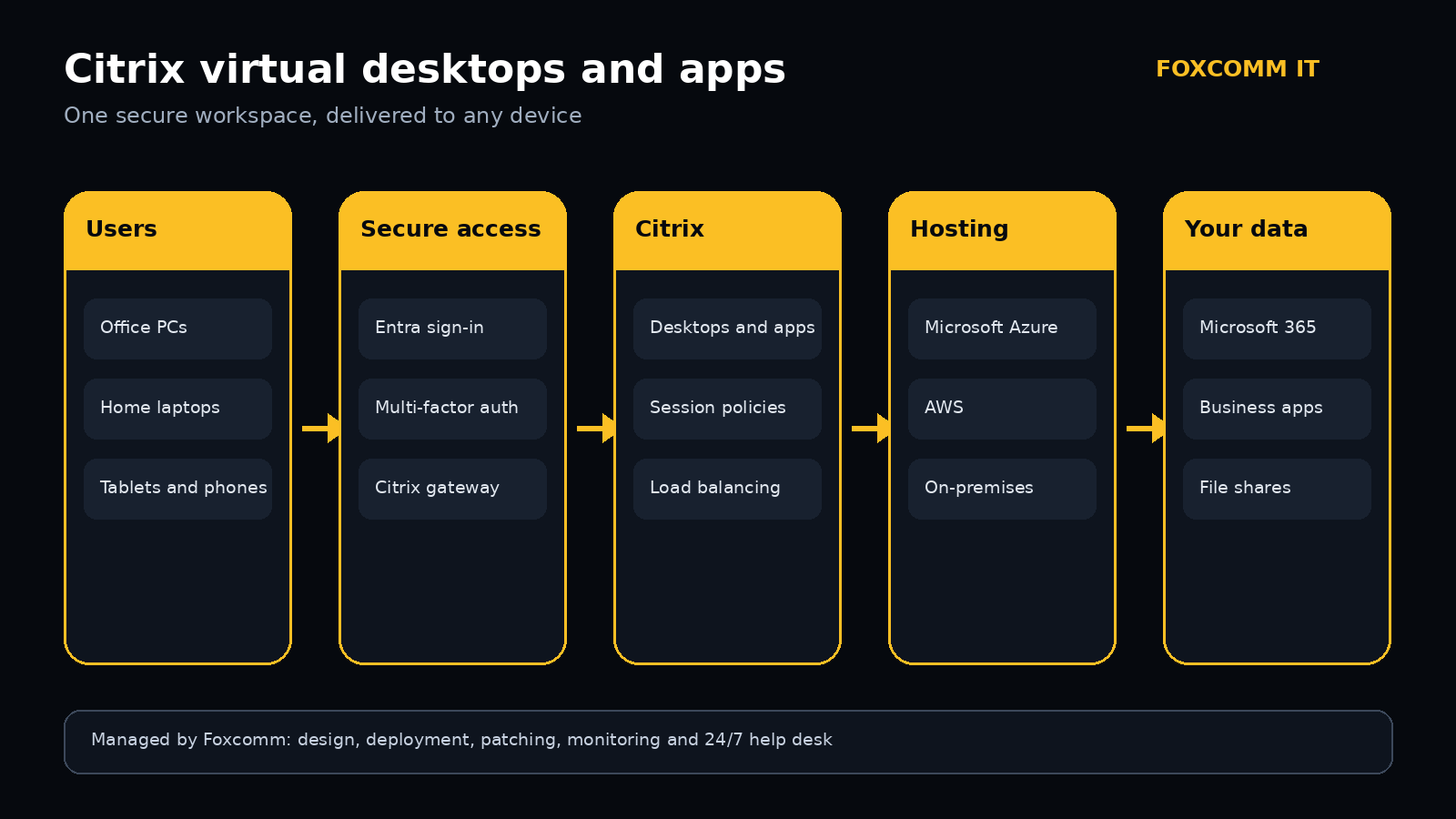
Citrix virtual desktops and apps deliver Windows desktops and applications from a central, secure environment to any device. Users see the same desktop whether they are in the office, at home or travelling, while data stays in the data center or cloud rather than on laptops. Foxcomm designs, deploys and manages Citrix environments on Microsoft Azure, AWS or your own infrastructure, and supports your users around the clock.
Benefits
• High-performance remote access, including graphics-intensive and legacy line-of-business applications
• Strong security: data stays central, with multi-factor authentication and session policies
• One golden image to patch and update, instead of hundreds of laptops
• Fast onboarding and offboarding, and safe bring-your-own-device working
• Resilient access with load balancing and optional disaster recovery sites
Best for finance, legal, healthcare and engineering firms, contact centers and any business with demanding or regulated applications. We integrate Citrix with Microsoft Entra sign-in and Microsoft 365.
Watch
See hosted virtual desktops in action
A short introduction to how a hosted virtual desktop works: your applications, files and settings live in a secure cloud environment and follow you to any device.
Benefits
Why businesses choose hosted virtual desktops
Work from anywhere
Staff open the same desktop, applications and files from the office, home or a client site, on a laptop, tablet or home PC.
Lower hardware costs
Processing happens in the cloud, so older devices last longer and you avoid buying and refreshing powerful workstations.
Security by design
Data stays in the hosted environment instead of on laptops, protected by multi-factor authentication, encryption, patching and monitoring.
Fast onboarding and offboarding
Create a ready-to-use desktop for a new starter quickly and remove access in a single step when someone leaves.
Scales up and down
Add or remove desktops as your team grows or changes, with no new hardware, for seasonal staff, contractors and acquisitions.
Centrally managed
One image, one set of applications and one policy for everyone, patched centrally and supported by our 24/7 help desk.
Why teams choose it
Hosted desktop benefits for New York teams

Work from anywhere
Staff sign in to their own desktop from almost any laptop, tablet or home computer, with the same applications and files wherever they are.
Faster onboarding
New starters get a working desktop without waiting for hardware to be ordered, imaged and shipped, so they can start productive work straight away.
Data stays put
Files live in the hosted environment rather than on individual laptops, so a lost or stolen device puts far less of your data at risk.
Simple offboarding
When someone leaves, their access is switched off in one place, with no devices to chase and no data left behind.
Consistent experience
Everyone works on a centrally managed desktop with the same applications, settings and performance, which makes support faster and faults rarer.
Lower hardware spend
Older or lower-cost devices can serve as access points, so you replace hardware less often and spend less on powerful laptops.
In detail
Hosted virtual desktops in detail
Azure Virtual Desktop
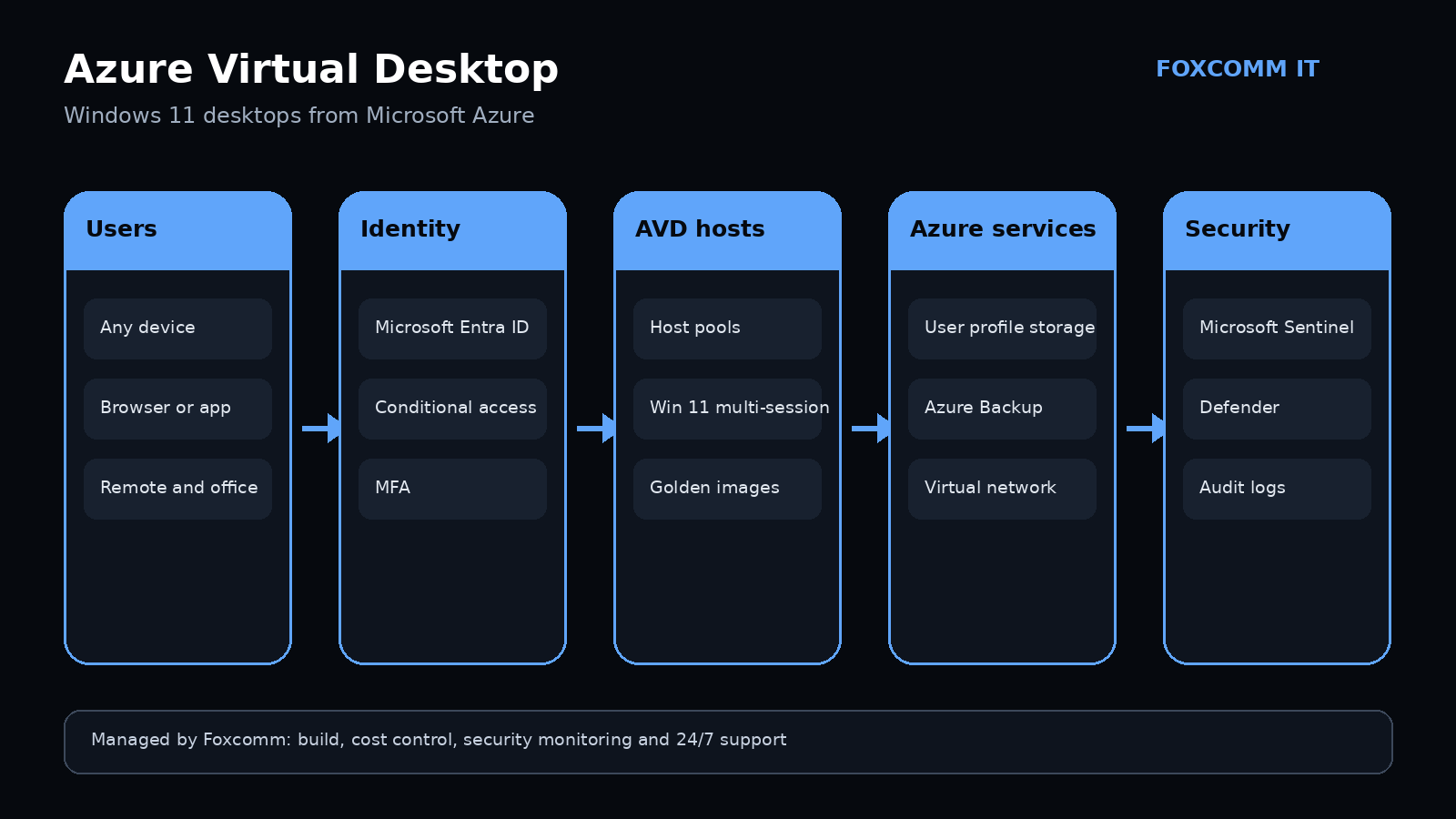
Azure Virtual Desktop delivers Windows desktops and applications from Microsoft's cloud. Foxcomm designs, builds and supports the environment, including user profiles, security and performance tuning.
AWS virtual desktops
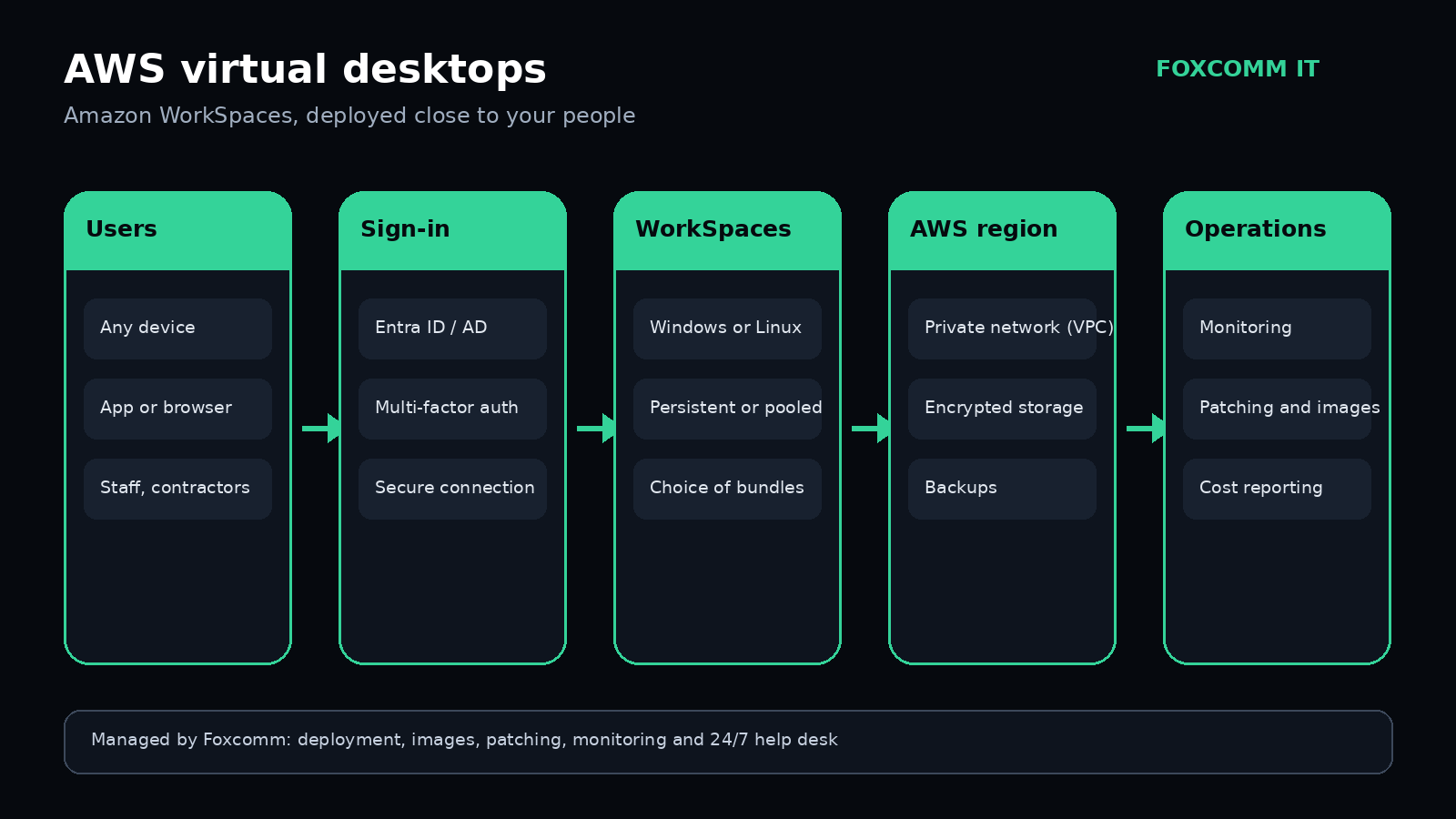
AWS virtual desktops (Amazon WorkSpaces) give each user a persistent cloud desktop. We deploy, secure and manage them, and integrate sign-in with Microsoft Entra for a consistent login experience.
Security and data protection
Data stays in the hosted environment, not on laptops. We add multi-factor authentication, conditional access, encryption, patching and monitoring, so a lost device does not mean lost data.
Support, onboarding and offboarding
New starters get a working desktop quickly and leavers lose access in one step. Our 24/7 help desk supports your users, with average tickets solved in 15 minutes.
Citrix virtual desktops
Foxcomm designs, deploys and supports Citrix virtual desktops and applications for businesses that need secure, high-performance remote access, including graphics-heavy and legacy applications. We build Citrix environments on Azure, AWS or on-premises infrastructure, integrate sign-in with Microsoft Entra and multi-factor authentication, and monitor sessions around the clock.
How it works
From requirements to a running virtual desktop
01. Requirements
We identify your users, applications and performance needs.
02. Build
We build and secure your hosted desktop environment and connect your applications.
03. Migrate
We move users and data across in groups, with training and support at each stage.
04. Support
We monitor, patch and support the platform, and adjust capacity as your team changes.
FAQ
Virtual desktops in New York and across the USA: your questions answered
What is a virtual desktop?
A virtual desktop is a full Windows desktop that runs in a secure cloud environment instead of on your laptop. You connect to it over the internet from almost any device and see the same desktop every time.
Are virtual desktops secure?
Yes. Data stays in the hosted environment rather than on endpoint devices, and we add multi-factor authentication, encryption, monitoring and backups, operating under ISO 27001 accredited processes.
Do you provide virtual desktops in New York?
Yes. Our US office is in New York and we host and support virtual desktops for New York and US businesses, with remote support and on-site help arranged where needed.
Can staff work from home on virtual desktops?
Yes. That is one of the main benefits. Staff connect from home, the office or while travelling and get the same secure desktop and applications.
How long does it take to move to virtual desktops?
It depends on the number of users and applications. We scope the migration with you, move users in phases and keep disruption low.
Explore related IT services and platforms
Get started
Ready to give your team a better desktop?
Speak to Foxcomm IT Services in New York or London about virtual desktops. Send a note and we will reply with sensible next steps.
Get a free quote